.png)
How to Create Notification Templates
💡Notification templates help make communication easier, faster, and more consistent by letting you pre-create templates for SMS, emails, notes, and document signing emails.
Steps:
Create a notification template
- Go to Admin, then under Jobs select Notification Templates.

- From here you can edit an existing template or create a new one by clicking New in the top right corner.

- Enter a Name for the template.

- Enter a Description if needed — this is only visible internally and helps document the template's purpose or any additional details.

- Select your Template Type: choose from SMS, Email, Note, or Document Signing. Document signing refers to the email that populates when sending a document to a customer to sign.

- Choose a Classification if required.

- Enter the content for your notification.
-
For email templates, you must also provide a Subject line.
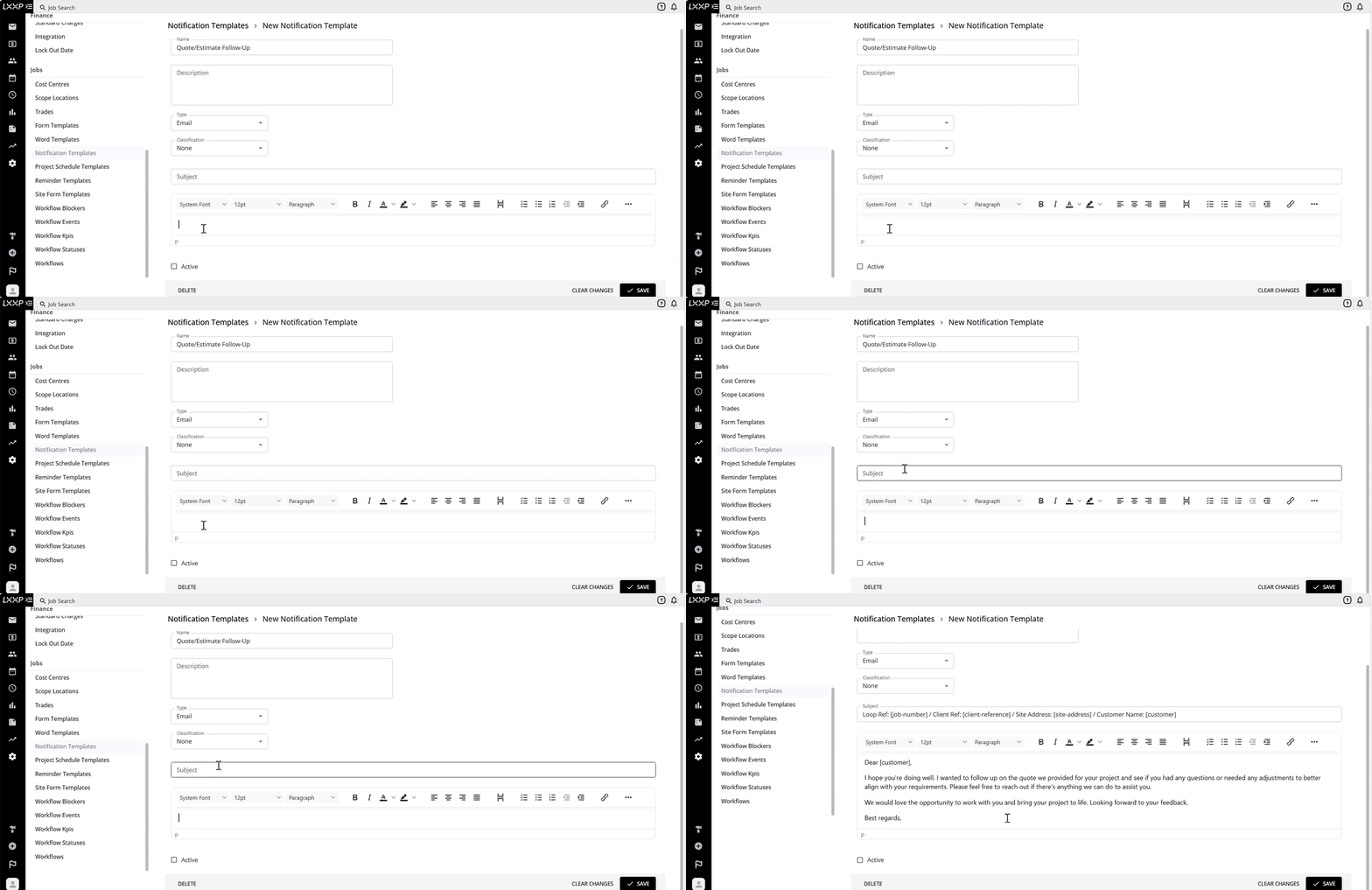
- If you want the template available for use, tick the Active box.

- Once completed, select Save.

Use your notification templates
- Email: In a job, go to Emails, select New Email, and choose New Message from Template. Your email templates will populate here.

- SMS: Select SMS Messages from the menu, choose who you'd like the SMS sent to, and select the template icon to open your SMS templates.

- Note: Navigate to Notes on a job and select the template icon to open your note templates.

- Document signing: When sending a document to a customer requesting a signature, the email template will populate automatically.

FAQ
What types of notification templates can I create? You can create templates for SMS, email, notes, and document signing emails.
What's the difference between the Description field and the actual content? The Description is only visible internally and helps document the template's purpose, it isn't sent to the recipient. The Content field is what actually gets sent or used.
Why isn't my template showing up when I go to use it? Check that the Active box was ticked and saved on the template, inactive templates won't be available for use.
Do I need a Subject line for every template? No, a Subject line is only required for Email-type templates.
What is a Document Signing template used for? It's the email that populates automatically when you send a document to a customer for signature.
❓ Need Help
If you have questions or need assistance, use the chat box in the bottom-right corner to contact the Loop Logics support team or email support@looplogics.com