.png)
How to Manually add Compliance Documents
Normally, you'd send your subcontractor a compliance request and let them upload their documents through the link they're emailed. But if you already have their compliance documents on file and don't need to request them again, you can add compliance records manually instead.
Steps:
Open the Subcontractor's record
- Go to Admin, then under Contacts select Subcontractors.
- Select the relevant subcontractor.

Check the compliance requirement exists
- Scroll down to Compliance Requirements and make sure a requirement has already been created for the document you're adding.

- If not, click Add Compliance Requirement and fill in the category, state, and document name, then save.
Add the compliance record
-
Under Compliance Records, click New Compliance Record.
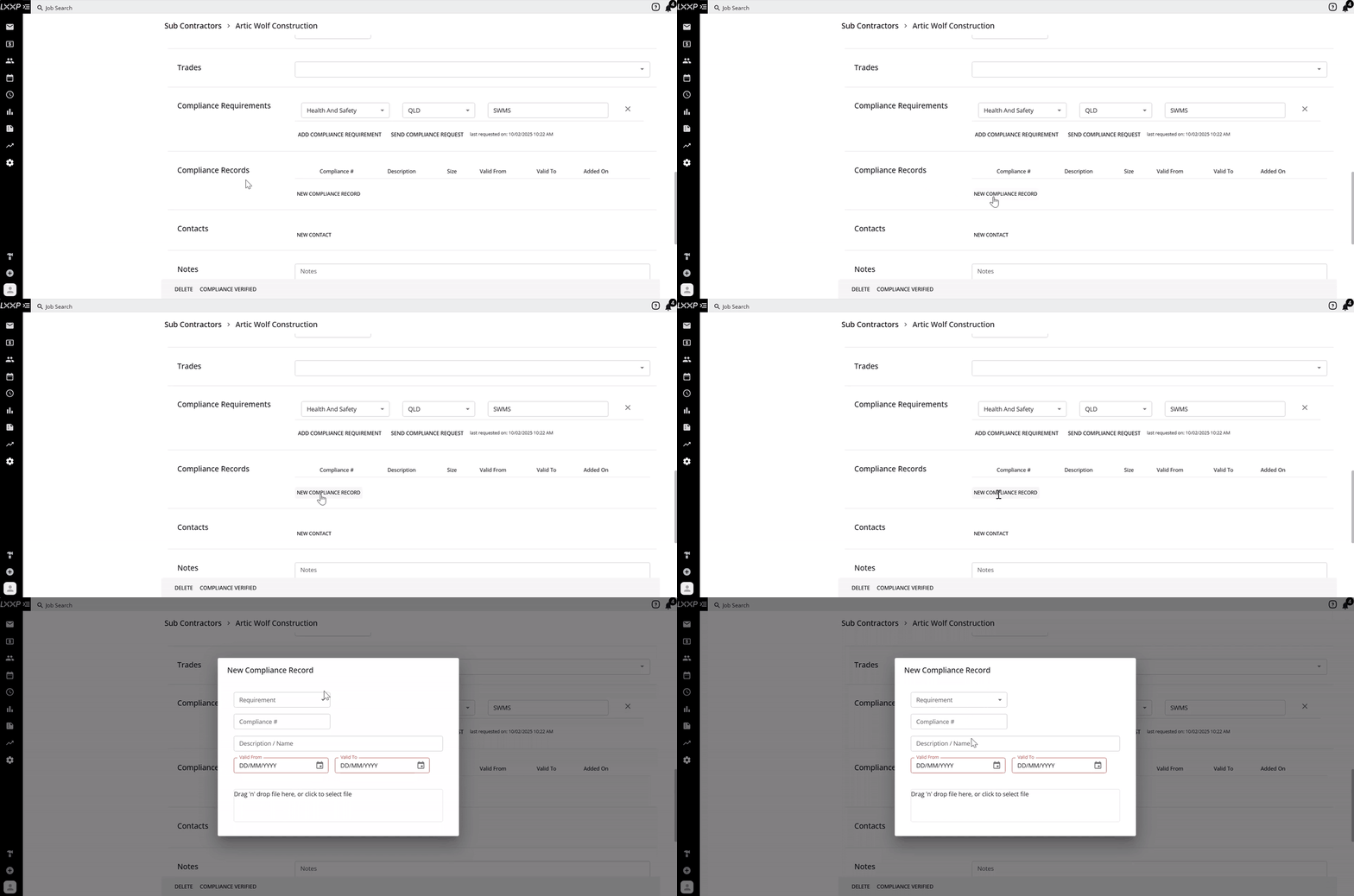
- Select the Requirement it relates to, and fill in the Compliance #, Description/Name, Valid From, and Valid To dates.

- Upload the compliance document in the designated upload box, once it's uploaded, the file name will appear underneath.

- Click Upload to save the new compliance record.

Verify Compliance
- Once you've added all the compliance records you need, click Compliance Verified.

- Click Save.

- The subcontractor will now show a green tick against their name in the Subcontractors list.

FAQ
When should I add a compliance document manually instead of requesting it? Use this when you already have the subcontractor's documents on file and don't need to send them a request to upload it themselves.
Do I need to create a compliance requirement first? Yes, a compliance requirement needs to exist before you can attach a record to it. If one hasn't been created yet, add it under Compliance Requirements first.
What happens after I click Compliance Verified and Save? The subcontractor's status updates to a green tick in the Sub Contractors list, showing that their compliance documents have been submitted and verified.
Can I add more than one compliance record at a time? Yes, repeat the New Compliance Record step for each document you need to add before verifying compliance.
❓ Need Help
If you have questions or need assistance, use the chat box in the bottom-right corner to contact the Loop Logics support team or email support@looplogics.com